
 Jovis AI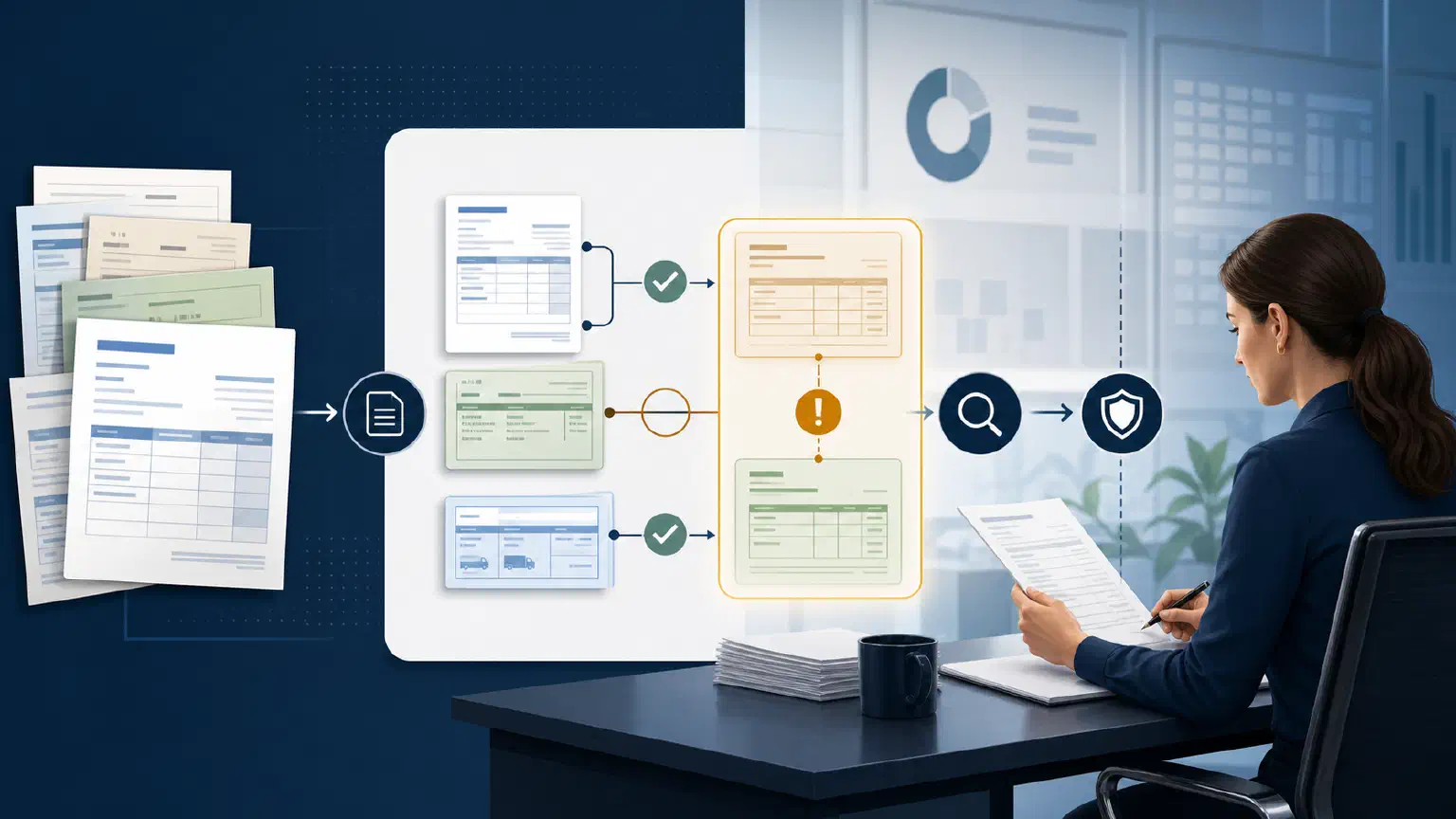
Accounts payable teams rarely need an agent to press the final payment button. They need help turning a messy invoice queue into a smaller set of reviewable decisions.
AI invoice processing is most useful when it separates repetitive preparation from financial authority. The system can extract fields, find the related purchase order and receipt, compare records, identify duplicate risk, and assemble an exception packet. A finance owner should still decide whether a mismatch is acceptable, whether a new supplier detail is legitimate, and whether an invoice may be posted or paid.
That boundary matters because invoice automation touches the ledger, supplier relationships, and cash. The goal is not “touchless” processing at any cost. It is a controlled path in which clean cases move quickly, uncertain cases carry their evidence, and no model output silently becomes a payment decision.
What AI invoice processing should do
An AI-assisted accounts-payable workflow uses models where documents and business context are difficult to normalize, while deterministic controls handle the decisions that must be repeatable.
| Workflow stage | Useful automation | Required control |
|---|---|---|
| Intake | Find invoices in approved channels and identify likely documents | Preserve the original file and source metadata |
| Extraction | Propose supplier, invoice number, dates, amounts, tax, currency, and line items | Validate field formats and retain the source location |
| Matching | Compare invoice lines with purchase orders and receipts | Apply explicit two-way or three-way matching rules |
| Review | Explain discrepancies, duplicate signals, and missing context | Route by amount, risk, and responsible owner |
| Posting | Prepare a draft record or structured handoff | Keep posting authority outside the model unless separately approved |
| Payment | Provide an approved invoice to the payment process | Enforce segregation of duties and final approval |
The distinction between matching and judgment is important. An ERP can compare invoice and purchase-order values according to configured policies. Microsoft’s accounts-payable documentation, for example, describes price, quantity, and totals matching for two-way and three-way validation. Read Microsoft’s invoice-matching overview for the underlying control concepts.
AI can make the preparation around those controls more useful. It can read a non-standard invoice, locate relevant records, summarize why a line failed a match, or identify that the apparent mismatch is caused by a partial receipt. It should not invent a receipt, override a tolerance, or treat a plausible explanation as approval.
Start with the invoice decision, not the document
Before choosing a model or connector, define the decision the workflow must support. “Process invoices” is too broad to evaluate. A first job might be:
For invoices referencing a purchase order, determine whether the invoice is ready for AP review, explain any mismatch against the order and receipt, and prepare the evidence needed for posting approval.
That sentence defines a population, a comparison, an output, and a boundary. It also gives the team a way to create a test set.
Write down the contract for one workflow:
- Which invoices are in scope: purchase-order invoices, non-PO invoices, or both?
- Which fields must be exact, and which can be proposed for review?
- What tolerances are approved for price, quantity, tax, and freight?
- Which source is authoritative for the order, receipt, supplier, and payment terms?
- Which role can correct coding, approve an exception, post the invoice, and release payment?
- What happens when a source is missing, stale, contradictory, or inaccessible?
Do not begin with every supplier and every invoice type. A bounded purchase-order workflow is easier to test than a promise to automate the entire invoice-to-pay process.
Build the evidence packet before the recommendation
The useful output is not an AI confidence score. It is a compact packet that lets an AP reviewer reach a decision without repeating the entire lookup process.
For each invoice, the packet should contain:
- The original invoice. Preserve the file, received timestamp, and intake location.
- Normalized fields. Show the extracted supplier, invoice number, currency, dates, subtotal, tax, total, and line items.
- Related records. Include the purchase order, receipt or service confirmation, supplier record, and relevant contract or terms when approved for the job.
- Comparison results. Show the exact values compared, the rule applied, and the variance rather than only “match” or “fail.”
- Duplicate signals. Compare invoice number, supplier, amount, date, and near-duplicate document characteristics against prior records. Treat a signal as a reason to review, not proof of fraud.
- Open questions. Identify what the workflow could not verify, such as a missing receipt or unclear service period.
- Proposed route. Recommend the next queue or owner, while clearly labeling it as a proposal.
This format gives a reviewer something more useful than a green light. It also makes later evaluation possible: the team can see whether the extraction was wrong, the source was incomplete, the matching policy was misapplied, or the routing was unclear.
Use three lanes for automation
One of the common mistakes in AP automation is treating every invoice as the same kind of work. Use separate lanes so the control standard matches the risk.
Lane 1: deterministic matches
An invoice whose required fields validate and whose lines satisfy the approved matching policy can move to the normal AP queue. The workflow should still preserve the invoice and comparison evidence. “Matched” means the configured conditions passed; it does not mean the supplier is always trustworthy or the business purpose is correct.
Lane 2: explainable exceptions
A quantity variance, price difference, missing receipt, tax inconsistency, or coding question should produce an exception packet. The agent may classify the issue and find the people or records that can explain it. An owner decides whether to correct the record, request information, accept the exception under policy, or reject the invoice.
Lane 3: control-sensitive cases
Route invoices with changed bank details, unusual supplier identity, duplicate indicators, large values, new suppliers, or conflicting authority to a higher-control path. Do not let a document-reading agent resolve these cases merely because it has found a plausible match. Supplier-master changes and payments deserve their own authority and audit trail. The existing controlled vendor master change workflow describes why a payment-impacting supplier update should be reviewed separately.
This lane model keeps extraction and investigation close to the work while preventing a broad instruction such as “approve valid invoices” from collapsing several different financial controls into one model decision.
Keep the model away from the security boundary
Invoices and attachments are untrusted inputs. They can contain misleading instructions, altered bank details, or text that tries to influence the agent. Treat document content as data to analyze, not as authority to follow.
Enforce access and action permissions in the application and source systems. The model may propose a record lookup or an exception route, but deterministic controls should decide whether the requesting user and workflow may see or change it. Give the workflow the minimum access needed for its defined job; a document parser does not need payment-release authority.
For higher-risk cases, separate the permissions for:
- reading invoice and purchasing evidence;
- proposing coding or an exception route;
- correcting a draft record;
- approving an exception;
- posting to the ledger; and
- releasing payment or changing supplier payment details.
NIST’s AI Risk Management Framework calls for documented roles and responsibilities in human-AI configurations and for defined human-oversight processes. The AI RMF Core is a useful reference when translating those principles into owners, review points, and escalation rules. It is guidance, not a substitute for your organization’s finance controls or expert review.
Test the workflow with difficult invoices
A demo with a clean PDF proves very little. Build a representative set from closed periods or safely redacted records and include cases that should not resolve automatically:
- a scanned invoice with a skewed page or unusual layout;
- multiple invoices with the same number from different suppliers;
- a near-duplicate invoice with a changed date or total;
- a partial delivery against a larger purchase order;
- a service invoice whose period does not match the order;
- a price variance inside and outside the approved tolerance;
- a credit memo that should not be treated as a new payable;
- a currency or tax treatment the workflow does not support;
- a changed supplier bank detail; and
- a missing receipt or inaccessible source record.
Score more than field extraction. Check whether the workflow selected the right records, applied the right business rule, respected permissions, stated what it could not verify, routed the case to the right owner, and preserved evidence. The data-quality control plan for AI agents provides a broader way to define source fitness, failure behavior, and ownership around an agent workflow.
Measure the queue, not just straight-through rate
Straight-through processing can be a useful operational measure, but it is a poor success criterion on its own. A system can increase the rate by hiding uncertainty or routing difficult cases incorrectly.
Track a balanced set of measures for the pilot:
- extraction corrections by field and supplier type;
- match decisions overturned by AP reviewers;
- duplicate and bank-detail cases surfaced before approval;
- exception packets missing a required record or explanation;
- time from intake to an assigned owner;
- time from exception assignment to a recorded decision;
- invoices incorrectly routed to an automatic or low-control lane; and
- corrections that lead to a rule, source, or test-set change.
The important question is whether reviewers can make safer, faster decisions with less repetitive lookup. A high automation percentage is not a win if it moves risk downstream into payment review or makes errors harder to reconstruct.
A practical first release
Run one controlled workflow alongside the existing AP process:
- Select one invoice population, such as purchase-order invoices for a defined business unit.
- Document the matching policy, tolerances, sources, owners, and approval boundaries.
- Create a test set with clean, ambiguous, and forbidden cases.
- Run extraction and evidence assembly in shadow mode; compare packets with the current review.
- Add reviewer feedback without allowing the workflow to post or pay.
- Review failures with AP, procurement, finance control, and data owners.
- Expand only when the evidence, permissions, routing, and recovery behavior are acceptable for the next risk tier.
Jovis is relevant when the hard part is investigating approved invoice, purchasing, supplier, or operational context across a governed workspace. It can help assemble and inspect the evidence around a defined review job; your finance system, policies, and accountable people still own posting, payment, and exception authority.
The right first target is therefore not “automate accounts payable.” It is one invoice queue with a clear contract, a visible evidence trail, and a reviewer who can say exactly what the workflow may and may not decide.