
 Jovis AI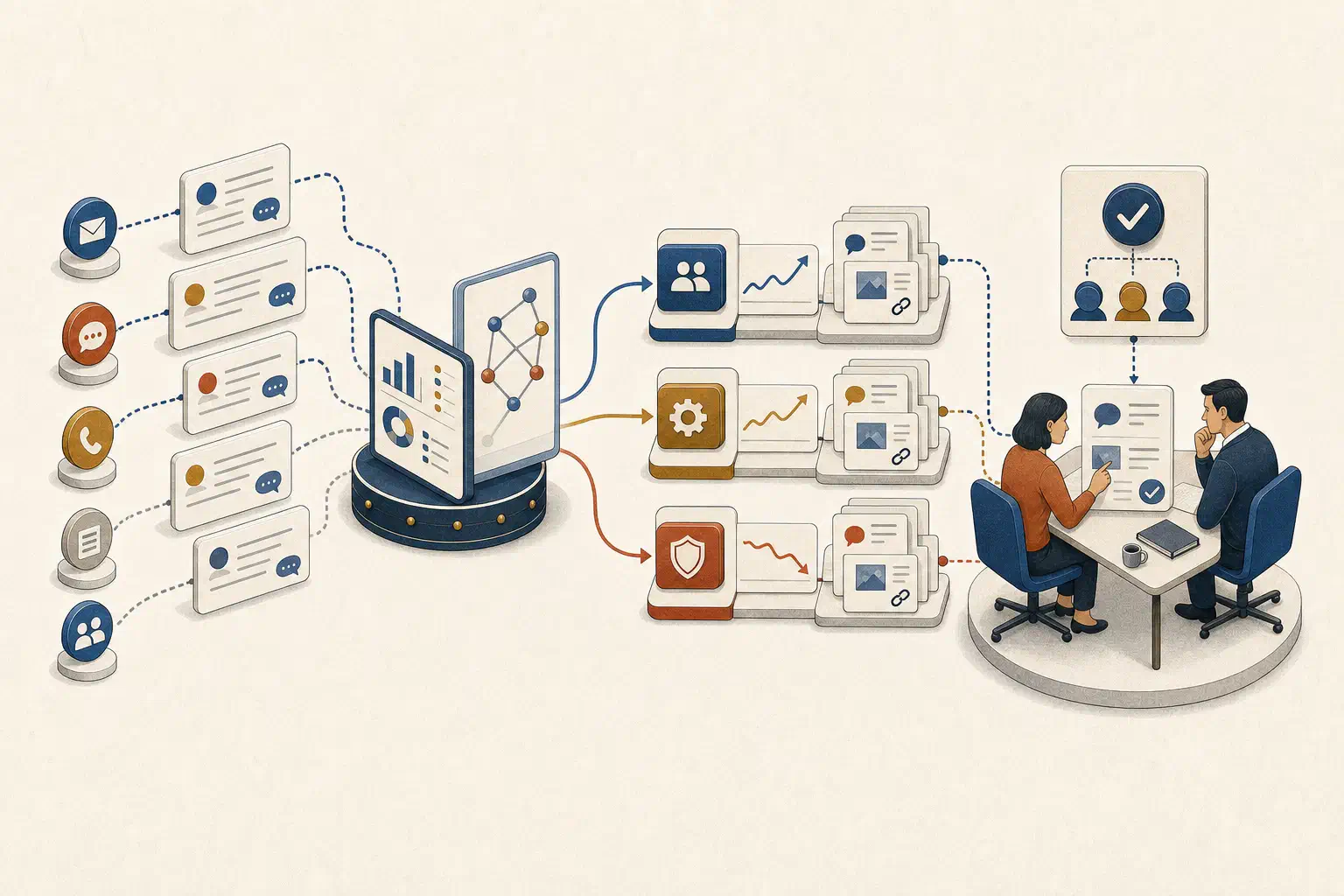
AI support ticket analysis is a repeatable process for grouping customer conversations into useful themes, detecting meaningful changes, checking the underlying evidence, and assigning a decision to the team that can act. The output should be a reviewed evidence packet, not a list of AI-generated labels.
That distinction keeps the work tied to an operating decision. A support leader does not need another colorful topic chart. They need to know whether a problem is growing, which customers and product areas it affects, what evidence supports the pattern, and who will decide what happens next.
The best first workflow is usually read-only. Let AI help organize and compare the evidence. Keep taxonomy changes, product priorities, customer communication, and other consequential actions with accountable people.
Define the decision before analyzing tickets
“Find insights in our support data” is too broad to evaluate. Start with a job that names the user, review window, business question, and next decision.
For example:
Every Monday, identify support themes that changed materially among paying customers, show the conversations behind each change, check for relevant releases or incidents, and prepare a brief for the support and product leads. They decide whether to investigate, update guidance, fix a workflow, or watch the pattern.
This job does not ask AI to determine product priority. It asks the system to give two responsible owners a better starting point.
Choose one decision for the pilot. Useful options include:
- which recurring issues need discussion in the weekly product-support review;
- which new themes after a release warrant investigation;
- which documentation gaps create repeated questions;
- which support processes cause avoidable handoffs or reopenings.
If the workflow also tries to route live tickets, draft replies, predict churn, score agents, and prioritize the roadmap, its failures will be hard to diagnose. The discipline used to build an AI agent around one narrow job applies here too.
Build the review cohort before the taxonomy
A topic model can only describe the conversations it receives. Define that set deliberately.
Record the following for every run:
- included inboxes, channels, products, customer segments, and languages;
- ticket states and the event date used for inclusion;
- excluded spam, internal tests, automated messages, and duplicate conversations;
- review period and comparison period;
- data extraction time and expected source lag;
- permission scope of the person reviewing the result.
The denominator matters as much as the ticket count. Fifty billing tickets may represent a serious increase, or they may reflect a customer base that doubled. Compare both the raw volume and a relevant rate, such as tickets per 1,000 active accounts, orders, or completed workflows. Choose the denominator that matches the business process behind the question.
Keep several dates if they affect the analysis. Created date measures incoming demand. Resolved date measures completed work. Reopened date can reveal that an apparent resolution did not hold. Many help desks also retain a history of field and comment changes. For example, Zendesk documents ticket audits as a read-only history of ticket updates. Preserving that event history makes it possible to reconstruct what the team knew at the time instead of analyzing only the latest ticket state.
Separate three kinds of classification
Support teams often mix operational tags, discovered themes, and business categories. They serve different purposes.
| Classification | Purpose | Example | Owner |
|---|---|---|---|
| Operational field or tag | Route and manage current work | Billing queue, severity 1, enterprise | Support operations |
| Discovered theme | Surface language and patterns not anticipated in advance | Export stalls after a large file reaches validation | AI-assisted analysis, human reviewed |
| Business taxonomy | Create stable reporting across time | Data import and export > export reliability | Support and product owners |
Operational tags are useful inputs, but they reflect the process that created them. Missing tags, macro habits, queue rules, and individual judgment can distort the picture. Discovered themes can reveal what the taxonomy missed, but their names and boundaries may change from one run to another. The business taxonomy provides continuity, but it needs an owner and a change process.
Use all three without pretending they are interchangeable. Let AI propose clusters and map them to the current taxonomy. Route uncertain or genuinely new clusters to a reviewer. Version any approved taxonomy change so a new label does not rewrite the apparent history without explanation.
Current support products illustrate both the opportunity and the limits. Intercom’s documentation explains that its AI topics group similar conversations, while also noting that teammate replies and macros can influence categorization because the full transcript is analyzed. That is a useful design warning for any implementation.
For problem discovery, consider analyzing the customer’s messages separately from agent replies. A standard macro can make unrelated tickets look similar. Keep a second view of the full conversation for understanding handling, diagnosis, and resolution. The two views answer different questions.
Detect movement, not merely large categories
The largest theme is not always the most important one. Password resets may dominate volume while a small new permissions failure blocks a strategic customer segment.
Review each theme across several signals:
- Volume: How many eligible conversations belong to the theme?
- Rate: How common is it relative to the relevant customer or transaction base?
- Change: How far did it move from a comparable baseline?
- Breadth: Is it concentrated in one account or spread across many?
- Consequence: Does it block a core workflow, create repeat contact, or affect a sensitive process?
- Evidence quality: Are the tickets clear, recent, and consistently classified?
Avoid a universal priority score at first. A transparent review rule is easier to challenge:
Review a theme when its rate increases beyond the team’s agreed threshold, it affects at least the minimum account count, and a reviewer can inspect enough supporting conversations to confirm that the grouping is coherent.
Set the threshold from your own volume and tolerance for noise. Low-volume teams may need a longer comparison window. Seasonal businesses should compare with a relevant historical period, not blindly with the previous week. A launch window may need an hourly or daily view, while documentation themes may only need a monthly review.
Create an evidence packet for every flagged theme
The evidence packet is the unit of work passed from support analysis to a decision owner. It should let a reasonable reviewer confirm the pattern without rereading the entire queue.
Include:
- Theme statement: A plain description of the customer problem, not an invented root cause.
- Cohort and period: The included population, current window, baseline, and extraction time.
- Movement: Count, rate, change, and concentration by relevant segment.
- Representative conversations: Ticket identifiers and short excerpts that show why each conversation belongs.
- Counterexamples: Borderline or excluded tickets that reveal where the theme boundary may be weak.
- Related business context: Releases, incidents, documentation changes, account attributes, or workflow events worth checking.
- Known gaps: Missing fields, restricted records, language exclusions, stale sources, and low sample size.
- Interpretation: A labeled hypothesis, separate from observed facts.
- Decision and owner: Investigate, change guidance, fix a process, plan product work, watch, or close with no action.
This follows the same principle as trusted AI answers with visible sources, definitions, and permissions. A theme summary becomes useful when the reader can inspect how it was formed.
Do not let a nearby release date turn correlation into a cause. “The increase began after release 4.2” is an observation. “Release 4.2 caused the increase” requires stronger evidence, such as affected versions, reproducible behavior, logs, or an engineering investigation.
Connect support evidence to product context carefully
Ticket text explains what customers reported. It rarely contains the complete product state.
A useful investigation may compare the theme with:
- release and deployment times;
- feature flags or product versions;
- affected plans, regions, or account configurations;
- incident records and status updates;
- documentation versions;
- known bugs and engineering work items;
- product usage around the reported workflow.
Connect only the sources needed for the job. A product reviewer may need a ticket excerpt and affected version without seeing sensitive commercial fields. A regional support lead should not gain access to other regions because the analysis uses a broad backend credential.
Some tools already preserve these boundaries. Teamwork’s current Ticket Trends documentation says agents can review related tickets only from inboxes they are allowed to access, even when a trend includes other inboxes. Whatever platform you use, test that principle with real permission boundaries before trusting the summary.
Treat ticket bodies and attachments as untrusted content. A customer or forwarded email can contain text that looks like an instruction to an agent. OWASP describes this as indirect prompt injection and lists issue descriptions, reviews, documents, and email among the possible sources. Its prompt-injection guidance recommends separating instructions from data, applying least privilege, monitoring outputs, and keeping human control over high-risk operations.
For a trend-analysis workflow, the simplest boundary is strong: tickets are evidence to classify and summarize. They cannot change the agent’s instructions, grant access, update a product record, or contact a customer.
Run a weekly support-to-product review
The meeting should be short because the evidence has already been prepared.
Before the review
The workflow builds the cohort, groups eligible conversations, compares themes with the baseline, and prepares evidence packets for the small number of changes that meet the review rule. A support analyst checks obvious grouping errors and restricted content.
During the review
The support and product owners inspect the evidence, challenge the hypothesis, and choose one outcome:
- investigate a possible defect;
- update documentation or an in-product explanation;
- change a support process or macro;
- add evidence to an existing product decision;
- monitor until the pattern clears a stronger threshold;
- close the item because the grouping or consequence is weak.
After the review
Record the owner, decision, due date, and link back to the evidence packet. On the next run, show whether the theme rate changed and whether the action occurred. This creates a tighter version of an AI-enabled weekly business review: movement, evidence, judgment, and commitment.
Do not measure success only by the number of detected themes. Track whether reviewers accepted the grouping, whether the packet changed or accelerated a decision, which themes were dismissed, and which meaningful issues the workflow missed.
Test the workflow before making it routine
Build a small evaluation set from historical ticket windows. Remove unnecessary personal data and keep the source snapshot needed for reproducibility.
Include cases such as:
- a real spike concentrated in one product version;
- a large stable category that should not be escalated;
- duplicate tickets created by an incident;
- a macro that causes false similarity;
- one large customer generating most of a theme;
- a new issue with several different descriptions;
- a restricted inbox the reviewer cannot access;
- multilingual tickets outside the pilot’s supported scope;
- an apparent improvement caused by missing ingestion;
- malicious instructions embedded in a ticket body.
Score the work at two levels. First, did individual tickets belong in the proposed theme? Second, did the complete evidence packet support the review decision? A good cluster can still produce a bad brief if it uses the wrong denominator, hides concentration, or implies a cause the records do not establish.
Sample accepted, rejected, and unassigned tickets on every run. Reviewer corrections should become regression cases. NIST’s Generative AI Profile recommends pre-deployment testing that reflects the deployment context, documented measurement, ongoing monitoring, and mechanisms for user feedback and override. Those practices fit this workflow directly because the taxonomy, customer language, product, and source systems will all change.
A four-week pilot
Week 1: define the job and cohort
Choose one inbox or product area, one decision owner, one cadence, and one comparison method. Document permissions, exclusions, and the denominator.
Week 2: build themes and evidence packets
Run historical conversations through the draft taxonomy. Review representative tickets, counterexamples, and unassigned items. Separate customer text from agent replies where macros distort the result.
Week 3: test boundaries and failures
Use the evaluation cases above. Remove a source, change a taxonomy label, deny an inbox, and include misleading content. Confirm that the workflow shows gaps instead of filling them with a confident explanation.
Week 4: run beside the existing review
Do not replace the current support or product process yet. Compare what the workflow surfaces with the issues people found independently. Turn disagreements into test cases and decide whether the evidence packets improved the meeting.
A credible pilot result is a repeatable path from a changing support theme to an inspected decision. It is not a claim that AI now knows what the product team should build.